GpuMatrix!

I’ve made a 3×3 Matrix filter for the GPU! Yay!

There’s two hidden nodes in Nuke, GpuOp and GpuFileShader, both are nodes that can run GLSL shaders realtime in the Nuke viewers.

I had a quick look at it eariler this year, one of the things that came out of it was a 3×3 matrix filter. Pretty much identical to the built in matrix in Nuke. But realtime on the gpu. While this nodes is pretty awesome for prototyping effects and creating interesting LUTs, it has all the limitations of any GPU shader. Some of them are :

  • Does not render
  • Only affects whats in the viewer (ie, results zoom dependent)
  • Memory limitations

But it does have some benefits like

  • Runtime dev environment
  • GpuOp node concatinates , can create complex effects
  • Shader code is portable

How to use it
Turn of any viewing lut and enable “use gpu whenever possible” in the prefs, download the shader and point the nuke GpuMatrix node to the text-file. As always, if you end up using the GpuMatrix in any form, you’re in beer-debt to me.

-theo

Nuke node below and click here to download the shader.

set cut_paste_input [stack 0]
version 6.1 v1
push $cut_paste_input
GPUFileShader {
shader_file "/net/homes/tgroeneb/Desktop/RND - theo projects/gpuMatrix.txt"
name GpuMatrix2
selected true
xpos -4664
ypos 2406
addUserKnob {20 User}
addUserKnob {26 Presets}
addUserKnob {22 Reset -STARTLINE T "this =nuke.toNode('this')\nthis\['v1'].setValue(0)\nthis\['v2'].setValue(0)\nthis\['v3'].setValue(0)\n\nthis\['v4'].setValue(0)\nthis\['v5'].setValue(1)\nthis\['v6'].setValue(0)\n\nthis\['v7'].setValue(0)\nthis\['v8'].setValue(0)\nthis\['v9'].setValue(0)\n\nthis\['val'].setValue(1)"}
addUserKnob {22 Sharpen -STARTLINE T "this =nuke.toNode('this')\nthis\['v1'].setValue(0)\nthis\['v2'].setValue(-1)\nthis\['v3'].setValue(0)\n\nthis\['v4'].setValue(-1)\nthis\['v5'].setValue(5)\nthis\['v6'].setValue(-1)\n\nthis\['v7'].setValue(0)\nthis\['v8'].setValue(-1)\nthis\['v9'].setValue(0)"}
addUserKnob {22 Blur -STARTLINE T "this =nuke.toNode('this')\nthis\['v1'].setValue(1)\nthis\['v2'].setValue(1)\nthis\['v3'].setValue(1)\n\nthis\['v4'].setValue(1)\nthis\['v5'].setValue(1)\nthis\['v6'].setValue(1)\n\nthis\['v7'].setValue(1)\nthis\['v8'].setValue(1)\nthis\['v9'].setValue(1)\n\nthis\['norm'].setValue(1)"}
addUserKnob {22 EdgeDetect -STARTLINE T "this =nuke.toNode('this')\nthis\['v1'].setValue(0)\nthis\['v2'].setValue(1)\nthis\['v3'].setValue(0)\n\nthis\['v4'].setValue(1)\nthis\['v5'].setValue(-4)\nthis\['v6'].setValue(1)\n\nthis\['v7'].setValue(0)\nthis\['v8'].setValue(1)\nthis\['v9'].setValue(0)\n\nthis\['norm'].setValue(0)"}
addUserKnob {22 Emboss -STARTLINE T "this =nuke.toNode('this')\nthis\['v1'].setValue(-2)\nthis\['v2'].setValue(-1)\nthis\['v3'].setValue(0)\n\nthis\['v4'].setValue(-1)\nthis\['v5'].setValue(1)\nthis\['v6'].setValue(1)\n\nthis\['v7'].setValue(0)\nthis\['v8'].setValue(1)\nthis\['v9'].setValue(2)"}
addUserKnob {26 ""}
addUserKnob {6 norm l Normalize +STARTLINE}
norm true
addUserKnob {7 val l "Pixel Offset" R 0 50}
val 5.2
addUserKnob {26 Matrix}
addUserKnob {3 v1}
v1 1
addUserKnob {3 v2 -STARTLINE}
v2 1
addUserKnob {3 v3 -STARTLINE}
v3 1
addUserKnob {3 v4}
v4 1
addUserKnob {3 v5 -STARTLINE}
v5 1
addUserKnob {3 v6 -STARTLINE}
v6 1
addUserKnob {3 v7}
v7 1
addUserKnob {3 v8 -STARTLINE}
v8 1
addUserKnob {3 v9 -STARTLINE}
v9 1
addUserKnob {26 ""}
addUserKnob {26 About -STARTLINE T "GPUmatrix v0.1 \ntheo@euqahuba.com"}
}

Prince of caribbean / Pirates of Persia

Here’s some work I did with the talented bunch at Framestore earlier this year, good times :)

You need to a flashplayer enabled browser to view this YouTube video
Make sure you hit that 1080p button kid!

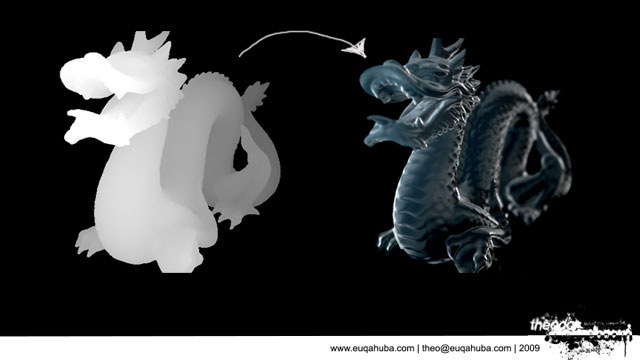
Shadows in Nuke

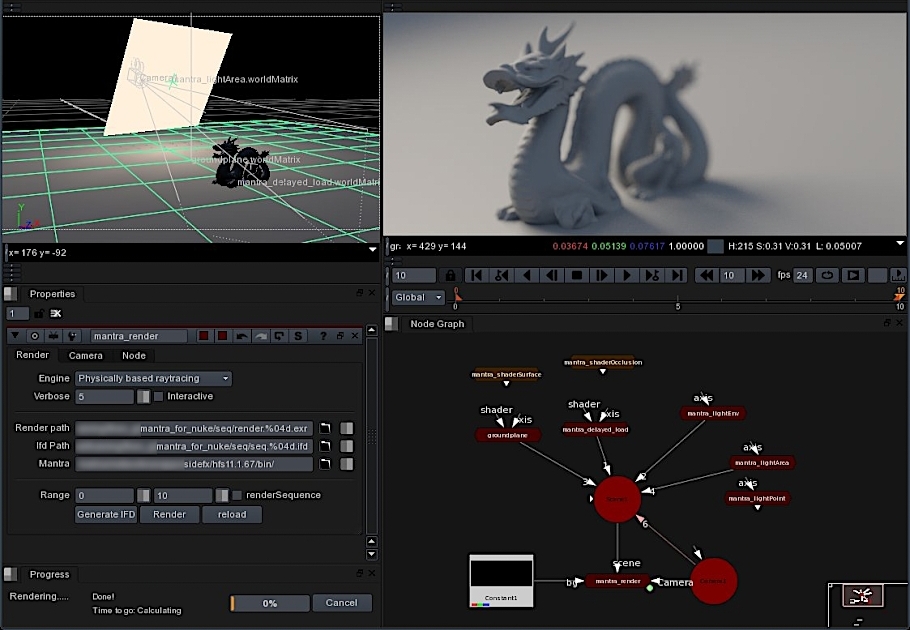
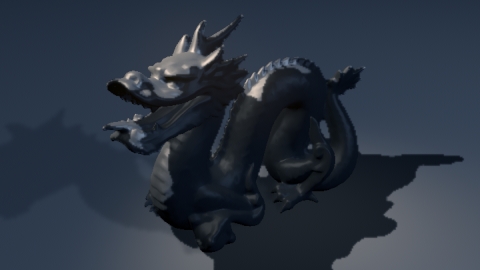
Self-shadowing complex objects.

So here’s a little trick to get some dodgy hacky shadows in Nuke , by comparing projected and “rendered” pWorld passes we can derive the difference easily and use that as a shadow matte. Still aliasing and various issues, but works fairly well. Node requires geo, camera, bg and lights. Supports all regular nuke geo.

*Nuke script with gizmo/group , Geo needs reloading.

http://www.euqahuba.com/tools/nuke_shadows.rar

*Just the group in a txt file

http://www.euqahuba.com/tools/shadows.txt

Now, to trace the rays…Zomg!

-theo

Slice and plot my scanline!

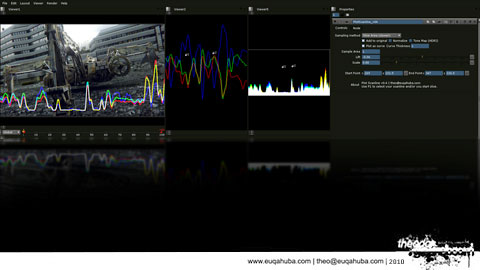
I’ve been playing with the expression node in Nuke lately, and one of the things I made was  a simple Slice tool/scanline plotter. It can sample a slice (between two points) and will plot the color values as a curve over the image.

I’ve wrapped it up in a group with a set of exposed parameters, but not exported as a gizmo, just because it might be handy to just copy/pasta it into your scripts somewhere  without the need to embed it into a pipeline.

It has three modes, per pixel which is checking the raw pixels, and a sample area which is similar to the per pixel method but it can sample a larger area pr pixel as well. (using the ex:  r(x,y,5,5) function) and one that will use the first point to determine which full scanline to sample and plot.

Maybe someone will find it usefull, maybe someone will……….buy me a beer….

set cut_paste_input [stack 0]
version 6.1 v1
push $cut_paste_input
Group {
name PlotScanline
selected true
xpos -839
ypos 206
addUserKnob {20 Controls}
addUserKnob {4 mode l "Sampling method" M {"Slice Per Pixel (faster)" "Slice Area (slower)" "Full Scanline" "" "" ""}}
mode "Full Scanline"
addUserKnob {6 add2image l "Add to original" +STARTLINE}
add2image true
addUserKnob {6 Normalize -STARTLINE}
addUserKnob {6 tonemap l "Tone Map (HDRI)" -STARTLINE}
addUserKnob {6 curve l "Plot as curve" +STARTLINE}
curve true
addUserKnob {3 curveFat l "Curve Thickness" -STARTLINE}
addUserKnob {3 sa l "Sample Area" t "Disabled when using pr pixel method."}
sa 1
addUserKnob {7 lift l Lift R -1 1}
addUserKnob {7 scale l Scale R 0 5}
scale 1
addUserKnob {26 ""}
addUserKnob {12 p1 l "Start Point"}
p1 {376 418}
addUserKnob {12 p2 l "End Point" -STARTLINE}
p2 {428.5 425.5}
addUserKnob {26 ""}
addUserKnob {26 "" l "About " T "Plot Scanline v0.4 | theo@euqahuba.com\nUse P1 to select your scanline and/or you start slice."}
}
Input {
inputs 0
name Input1
xpos -480
ypos 62
}
set N3069610 [stack 0]
Expression {
temp_name0 length
temp_expr0 sqrt(r*r+g*g+b*b)
expr0 r/length
expr1 g/length
expr2 b/length
name Normalize
xpos -480
ypos 108
disable {{1-parent.Normalize i}}
}
Expression {
expr0 r/(r+1)
expr1 g/(g+1)
expr2 b/(b+1)
name tonamap
xpos -480
ypos 134
disable {{1-parent.tonemap i}}
}
set N7fe58a0 [stack 0]
Expression {
temp_name0 rExpr
temp_expr0 "min(max(0,\r\nceil(r(x,parent.p1.y)-((y/height+parent.lift)*parent.scale))),1)"
temp_name1 gExpr
temp_expr1 "min(max(0,\r\nceil(g(x,parent.p1.y)-((y/height+parent.lift)*parent.scale))),1)"
temp_name2 bExpr
temp_expr2 "min(max(0,\r\nceil(b(x,parent.p1.y)-((y/height+parent.lift)*parent.scale))),1)"
expr0 rExpr
expr1 gExpr
expr2 bExpr
expr3 0
name scanline
xpos -302
ypos 193
addUserKnob {20 User}
}
push $N7fe58a0
Expression {
temp_name0 rExpr
temp_expr0 "min(max(0,\r\nceil(r((x/width)*(parent.p2.x-parent.p1.x)+parent.p1.x,(x/width)*(parent.p2.y-parent.p1.y)+parent.p1.y,parent.sa,parent.sa)-((y/height+parent.lift)*parent.scale))),1)"
temp_name1 gExpr
temp_expr1 "min(max(0,\r\nceil(g((x/width)*(parent.p2.x-parent.p1.x)+parent.p1.x,(x/width)*(parent.p2.y-parent.p1.y)+parent.p1.y,parent.sa,parent.sa)-((y/height+parent.lift)*parent.scale))),1)"
temp_name2 bExpr
temp_expr2 "min(max(0,\r\nceil(b((x/width)*(parent.p2.x-parent.p1.x)+parent.p1.x,(x/width)*(parent.p2.y-parent.p1.y)+parent.p1.y,parent.sa,parent.sa)-((y/height+parent.lift)*parent.scale))),1)"
expr0 rExpr
expr1 gExpr
expr2 bExpr
expr3 0
name Expression_highQuality
xpos -515
ypos 197
addUserKnob {20 User}
}
push $N7fe58a0
Expression {
temp_name0 rExpr
temp_expr0 "min(max(0,\r\nceil(r((x/width)*(parent.p2.x-parent.p1.x)+parent.p1.x,(x/width)*(parent.p2.y-parent.p1.y)+parent.p1.y)-((y/height+parent.lift)*parent.scale))),1)"
temp_name1 gExpr
temp_expr1 "min(max(0,\r\nceil(g((x/width)*(parent.p2.x-parent.p1.x)+parent.p1.x,(x/width)*(parent.p2.y-parent.p1.y)+parent.p1.y)-((y/height+parent.lift)*parent.scale))),1)"
temp_name2 bExpr
temp_expr2 "min(max(0,\r\nceil(b((x/width)*(parent.p2.x-parent.p1.x)+parent.p1.x,(x/width)*(parent.p2.y-parent.p1.y)+parent.p1.y)-((y/height+parent.lift)*parent.scale))),1)"
expr0 rExpr
expr1 gExpr
expr2 bExpr
expr3 0
name perPixel
xpos -419
ypos 201
addUserKnob {20 User}
}
Switch {
inputs 3
which {{parent.mode i}}
name Switch2
xpos -480
ypos 253
}
Matrix {
matrix {
{0 1 0}
{1 -4 1}
{0 1 0}
}
name Matrix2
selected true
xpos -480
ypos 284
disable {{-1+parent.curve i x70 1}}
}
Dilate {
size {{parent.curveFat}}
name Dilate1
xpos -480
ypos 326
disable {{-1+parent.curve.main}}
}
Clamp {
name Clamp1
xpos -480
ypos 383
}
set N86e9e00 [stack 0]
push $N3069610
Dot {
name Dot1
xpos -556
ypos 66
}
Clamp {
maximum 331
name Clamp2
xpos -590
ypos 352
}
Merge2 {
inputs 2
operation plus
bbox intersection
name Merge1
xpos -590
ypos 394
}
Dot {
name Dot2
xpos -556
ypos 433
}
push $N86e9e00
Switch {
inputs 2
which {{parent.add2image i}}
name Switch1
xpos -480
ypos 425
}
Output {
name Output1
xpos -480
ypos 470
}
end_group

Back in ’95!

While doing some cleaning , I found a few really really old projects of mine. I used to be ( or rather liked to think I was ) part of the demoscene in Norway, stuff I quickly got more into doing more the graphic related programming and music creation. But a few “productions” surfaced over the years, all of this stuff dates 1995-1996.

Intro
2d Intro, text scrollers, wobblies and triangles. Having fun using Pascal and Asm, had no idea what I was doing but it came out looking like this most of the time.


Immortal Kombat.

Imk was a arcade fighting game, with 5 playable characters, 2 player or against the computer. Programmed in Pascal, gfx with DeluxePaint2 and 3ds4, music in Ft2.

Light my fire……

Here some spanking new tools I’m writing for Nuke….

Care to guess what it does?

Technical reel 09

Here’s a selection of some of my tools for 3dsMax and Fusion, I got some new ones for Nuke now that I’m probably going to show soon :)

You need to a flashplayer enabled browser to view this YouTube video

The big bad Digger!

Here’s something I did last year, sorry boot crappy youtube quality, so check the pics below for all the detail.

You need to a flashplayer enabled browser to view this YouTube video

Aftermath, more destruction huh?

Single frame camera projection in Fusion, just the regular destruction and mayhem.. Done in 2007.

The actual Fusion comp and original plate is available for free at vfxpedia.

You need to a flashplayer enabled browser to view this YouTube video

Head modeling……

Just another angry 3d head dude……

WIP model and texture…..